Follow a launch plan you were put in charge of
Someone at your church asked you to own a launch, like a new way of welcoming guests or a new check-in system, and sent you a link. That link is your whole plan: the dates, who does what, and the printouts. There's no account or password to set up.
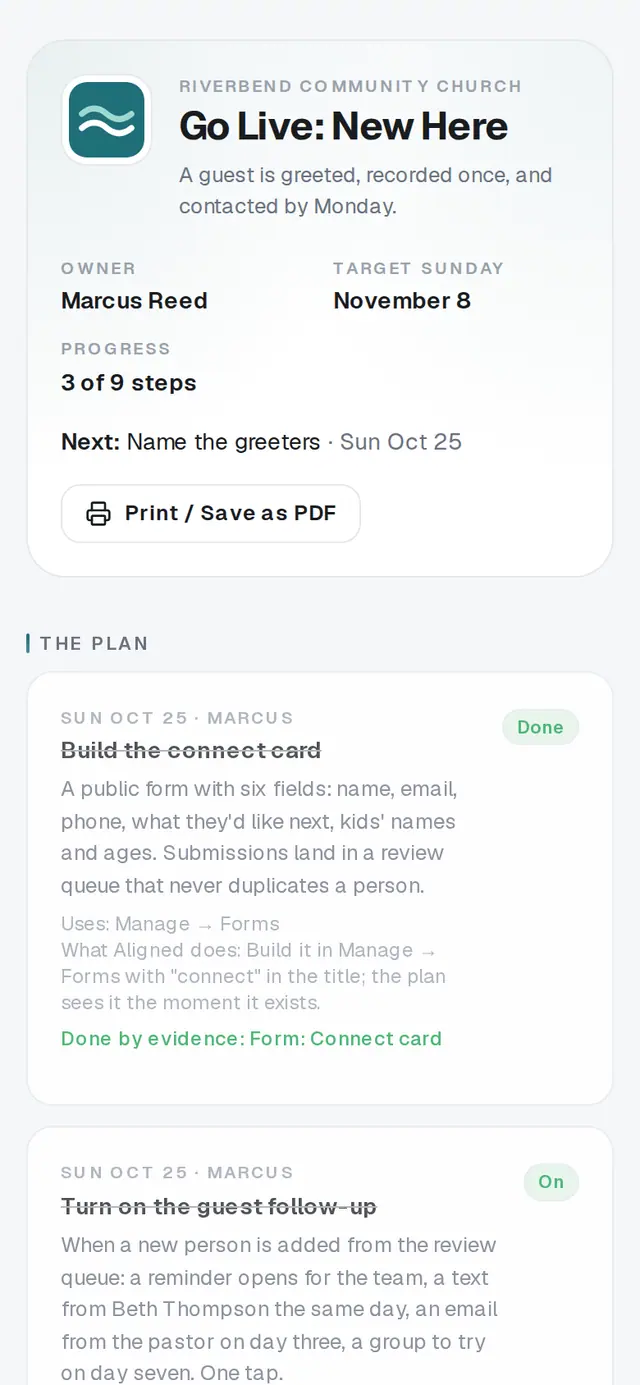
1/6 · Open the link from your text or email
Good to know
- Your link can't send anything to your church, switch on the automatic follow-up, or change the plan's date or answers. The office does those in the app, so a forwarded link can never message your congregation.
- Helping hands welcome: anyone you forward the link to sees the same plan and can tick steps off too.
- The Monday after your Sunday, you'll get a short How it went email with that Sunday's numbers and the next thing to do.
If it’s not working
It says “This link isn't valid”
Check the whole address came through, or ask your church to send you the link again from the plan.
A step has no Mark done button
It's either done by what actually happens, something the office does from the app (a message or the follow-up), or something that runs on its own. The line under the step says which.
I can't skip a step
Only steps marked optional have a Skip button. For anything else that isn't going to happen, tell the office.
A step I marked done went back to waiting
Some steps also wait on something outside the plan, like your church's giving being approved or its texting number going live, and read Waiting until that happens. Nothing you did is lost.
Next, you might want to
- Plan the Sunday you launch something newUse Go Live to pick a launch Sunday, name an owner, and get dated steps, a printed kit and messages already written.
- Follow up with every newcomerSet up a newcomer follow-up plan, put new people in it, and move each person through the steps until they're connected.
- Check kids in safely on Sunday morningSet up a check-in station, open it on a lobby tablet, decide on guest check-in, and plan the Sunday you start.