Check your kids in on Sunday
Sunday mornings move fast, and check-in shouldn't slow you down. Once your family is in your church's system, checking in is a search, a couple of taps and one code to keep for pickup.
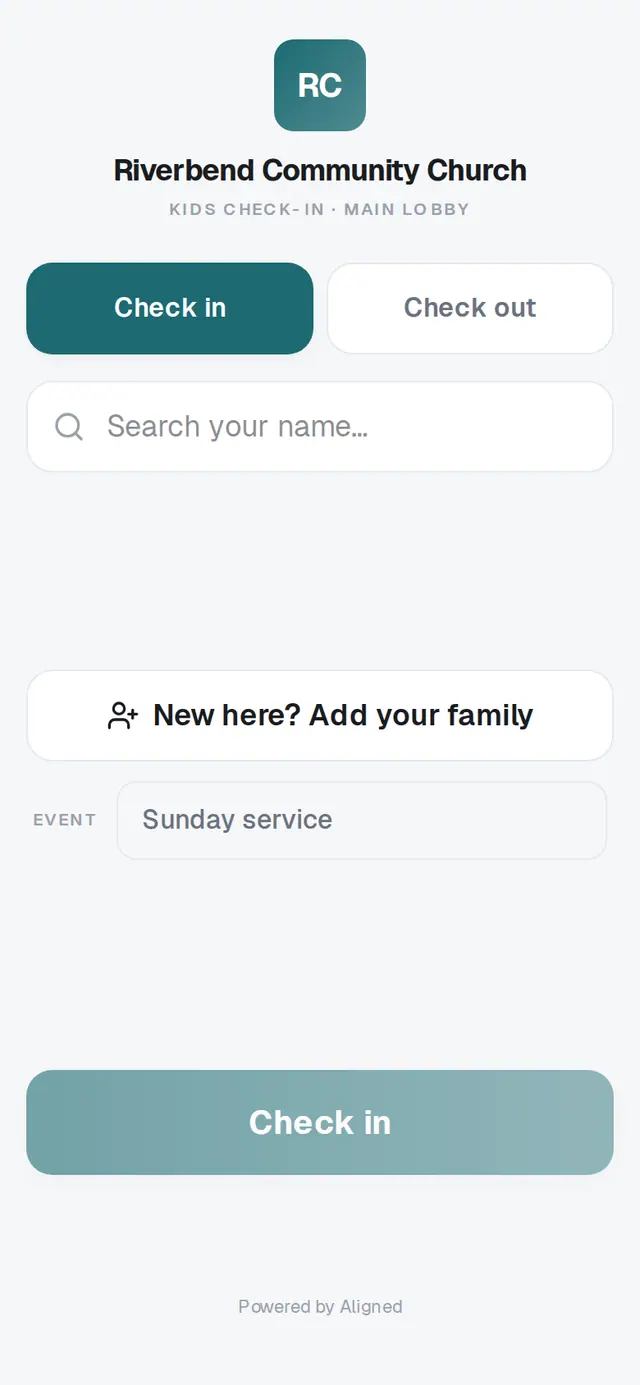
1/6 · Find your church's check-in screen
Good to know
- The Event line under the search is already filled in, usually Sunday service. Leave it unless a volunteer asks you to change it.
- At pickup, the same screen has a Check out tab. Your code checks out everyone who shares it.
If it’s not working
It says “No matches” when I search
Your family isn't in your church's records yet, or it's under a different last name. Tap New here? Add your family to add everyone, then check in.
I can't add everyone
One check-in holds up to 8 people. Check in the first group, tap New check-in, then check in the rest — they'll get their own code.
It says “Couldn't reach the server — check the connection and try again.”
The station lost its internet connection for a moment. The names you picked are still there, so tap Check in again. If it keeps happening, grab a volunteer.
The name tags didn't print
Printing depends on your church's printer. Tap Print or show the code on the screen, and let a volunteer know. Your children are checked in either way.
It says “This station is going too fast.”
A lot of families checked in at once. Wait a few seconds and tap Check in again.
Next, you might want to
- New here? Add your family at check-inAdd your family at the check-in screen on your first visit, then check your kids in with one more tap.
- Pick up your kids after churchType the security code from check-in to check your children out — everyone who shares it goes together.
- Update your contact info with your churchChange your phone, email or address from your church's link, and see your church life in one place on your member hub.