Use your church workspace on your phone
Plenty of church work happens between services, on a phone in the hallway. Aligned Church works the same on a phone as on a computer; only the map changes. Here's where everything moved.
About 2 minutes Part of Aligned ChurchUpdated September 29, 2026
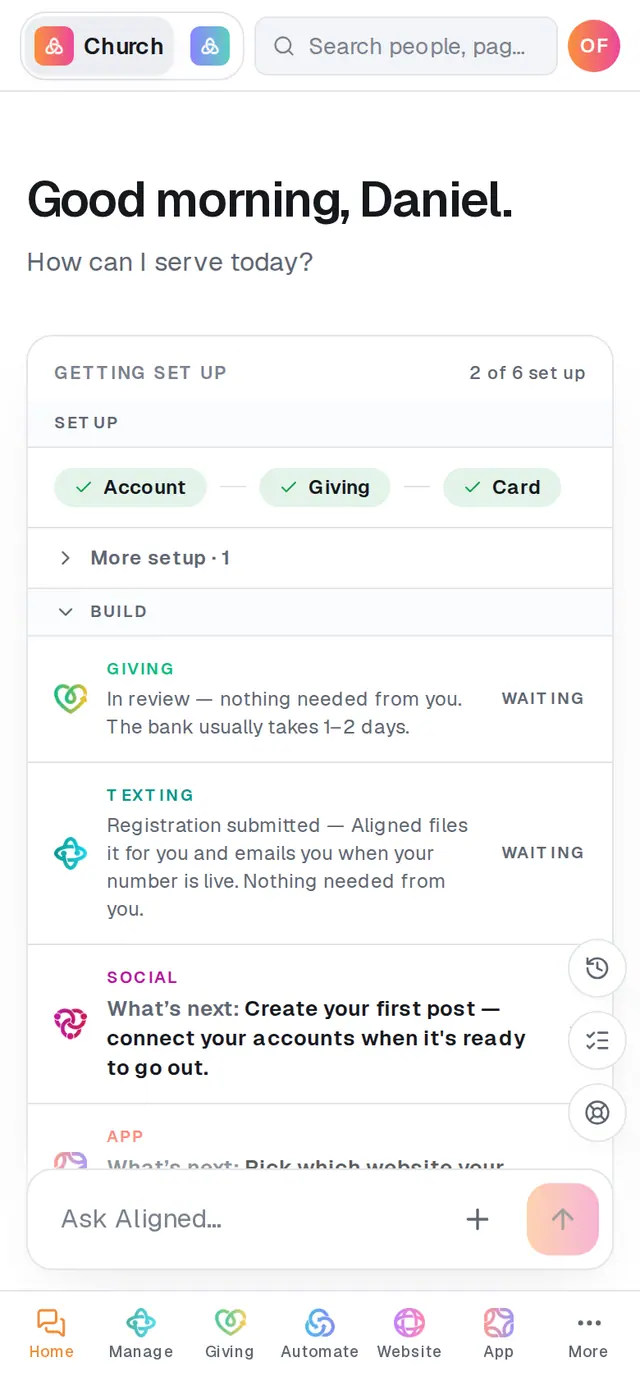
1/6 · Tap a module in the bar along the bottom, like Manage
Good to know
- The search bar at the top of the screen opens the same search a computer has, with people, pages and quick actions in one place.
- The Leader | Church switch at the top left moves between Aligned Church and Aligned Leader.
- A dot on a tab means that module is waiting on something from you.
- On a staff seat, the bar shows only the modules your role includes, plus More.
If it’s not working
I can't find Social or Research
They're not in the bar. Tap More and they're with the other modules.
Where did the notifications bell go?
There's no bell on a phone. A dot on a tab shows which module is waiting on something.
There's no Import on my phone
Import opens from the Bring your church's data in row on your Home checklist, or search for “import”.
Did this help?
Next, you might want to
- Find your way around your church workspaceWhere your modules live, how to change pages, search for anything, and get back to the chat.
- Ask Aligned questions and have it do the workAsk how something works, have Aligned add people and events for you, open any page by asking, and attach files to the chat.
- Get help from a real personMessage the Aligned team from inside your workspace, and what happens after you press send.