Keep sensitive information private
A custody arrangement, a counseling case, a family behind on rent: some of what your church keeps should only reach a few people. Aligned Church has a few plain controls for that: who can open what, fields only some staff see, care cases only the owner and the assigned person see, and a way to take someone off your roster without deleting anything.
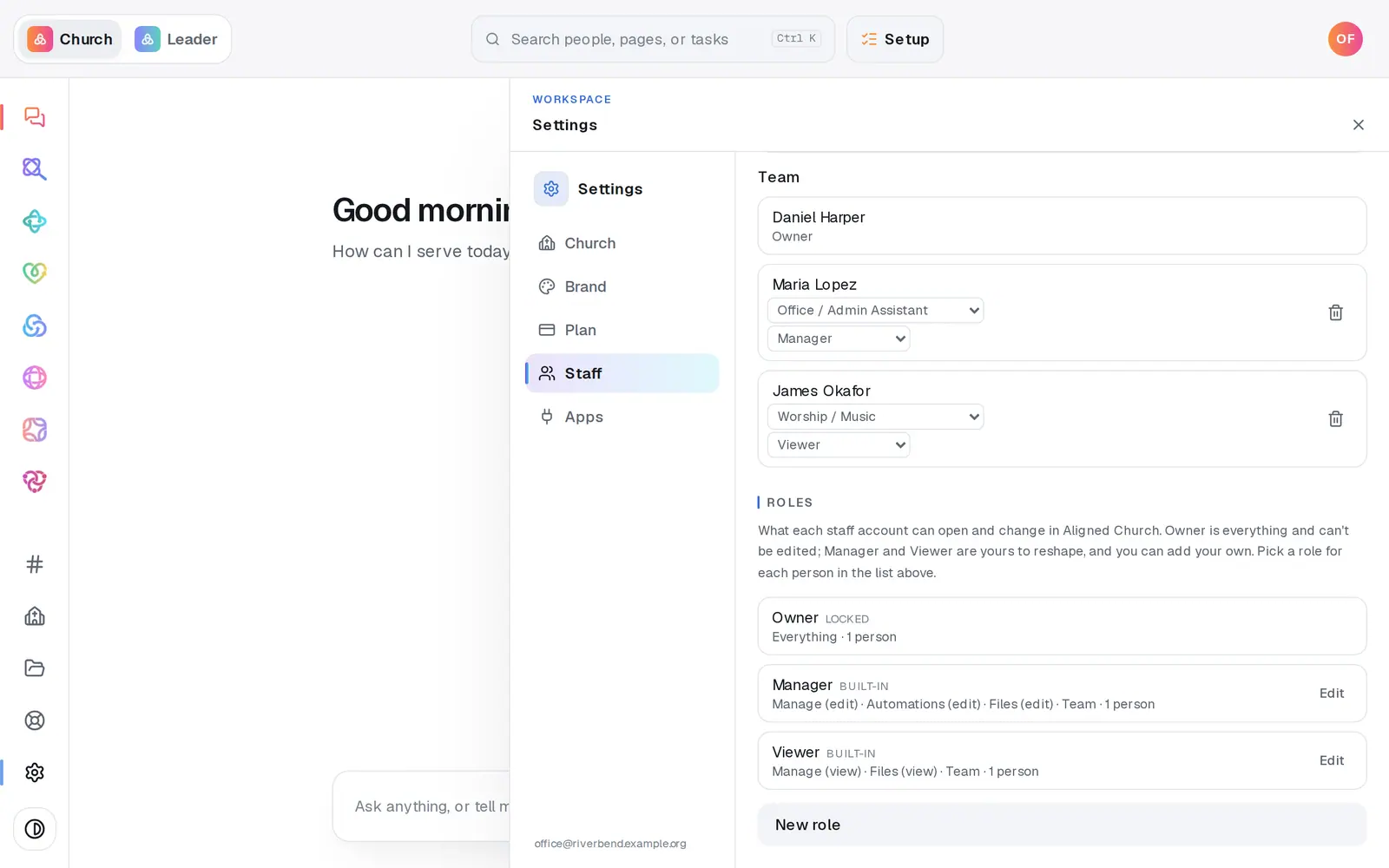
1/5 · In Settings, choose Staff and read the Roles list
Good to know
- Staff whose role can only view Manage, like the built-in Viewer, never see Care, Prayer, Activity, Reports, or the files attached to a person.
- Anyone whose role can open Manage, Viewer included, sees the notes and Medical line on a profile. Keep anything more private in a field marked Sensitive.
- The built-in Manager and Viewer roles leave the Giving module at None, but Manage has a Giving page of its own: anyone whose role can open Manage sees your giving totals and recent gifts there, with donors' names and amounts.
- Deleting a note or a value takes it off the profile, but Activity, your change history, keeps every edit for as long as your church's records exist. The privacy policy at aligned.church/church/privacy says what Aligned keeps and why.
If it’s not working
A staff member can't see Care, Prayer or Reports
Those pages are for staff whose role can edit Manage. If they need them, press Edit on their role in Settings → Staff and set Manage to Edit, or pick a role that has it.
Someone on staff can't see a field the rest of us can
It's marked sensitive (it has a 🔒), and their role can only view Manage. That's what the tick box is for.
Someone asked us to delete their information
Archive them first, so they drop off your lists and sends straight away. Then message us from Help with their name, and a person takes care of the deletion. Giving records are the exception: they're kept for as long as the law requires.
I archived someone by mistake
Under the table on People, press View archived people, then Restore next to their name.
Next, you might want to
- Choose what each staff member can see and doGive someone just the website, just your people, or more, with roles you can edit, and change what they can open any time.
- Track a benevolence or care needOpen a care case when someone needs help, log what your church does and gives, and close it when the need is met.
- Archive or restore a personTake someone who moved away off your roster without deleting a thing, and bring them back if they return.
- Track baptisms, allergies and other detailsAdd your own fields, like a background check date, allergies or a T-shirt size, and check off milestones like baptism on anyone's profile.