Find your way around on your phone
On a phone there's no room for a row of icons down the side, so Aligned keeps everything behind two doors: the bar along the bottom and the More menu. Learn those two and nothing is more than a couple of taps away.
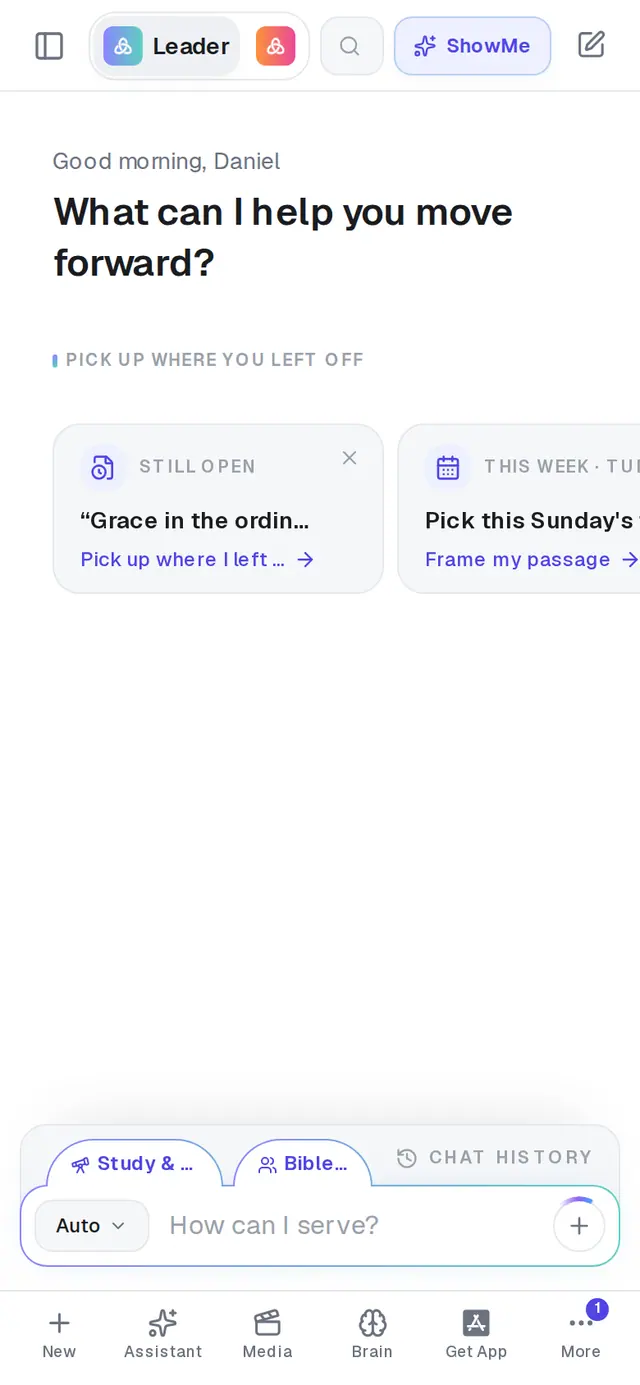
1/6 · Use the bar along the bottom for the places you visit most
Good to know
- Your past conversations are in Chat History, the bar sitting just above the message box. Tap it and the list slides up over the chat.
- Meetings doesn't have a tab — tap the format button at the left of the message box and choose Record meeting.
- The bottom of the menu shows your plan, a Download App button if you haven't got the app yet, and Sign out.
If it’s not working
There's no bar along the bottom
Either you're not signed in (the bar is for signed-in accounts — use the menu icon at the top-left), or a document is filling the screen. Tap the back arrow at the top-left of the document (Back to chat) and the bar comes back. The Books screen doesn't have the bar either.
Where did the Support tab go?
It moved into the menu on September 26, 2026. Tap More, then Support. When our team replies, the number shows on More as well as on the Support row, so you won't miss it.
I can't find Saved or Books in the menu
They appear once they have something in them: Saved after you save your first piece of work, Books after you start a book. Nothing is missing from your account.
Brain isn't in my menu
If you're on a church's staff, the owner can turn off staff access to the Church Brain, and then Brain leaves the menu and the bar. Ask them to switch it back on in their settings.
Next, you might want to
- Find your way around AlignedWhere chat, Brain, Media, Assistant, Saved and Settings live on a computer, and what the top bar tells you.
- Get Aligned on your iPhone or AndroidDownload the app or add a home-screen shortcut, sign in with the same account, and keep it up to date.
- Get help from a real personMessage the Aligned team, send a feature idea or bug report, and know what happens after you send.
- Find a past chat or sermonGet back to a conversation from yesterday or last month, even if you only remember a phrase.