Get Aligned on your iPhone or Android
Ideas don't wait until you're back at your desk. The phone app is the same Aligned you use on the web — same chats, same Brain, same saved work — plus notifications, and meeting recording that keeps going when the screen locks. It takes a couple of minutes.
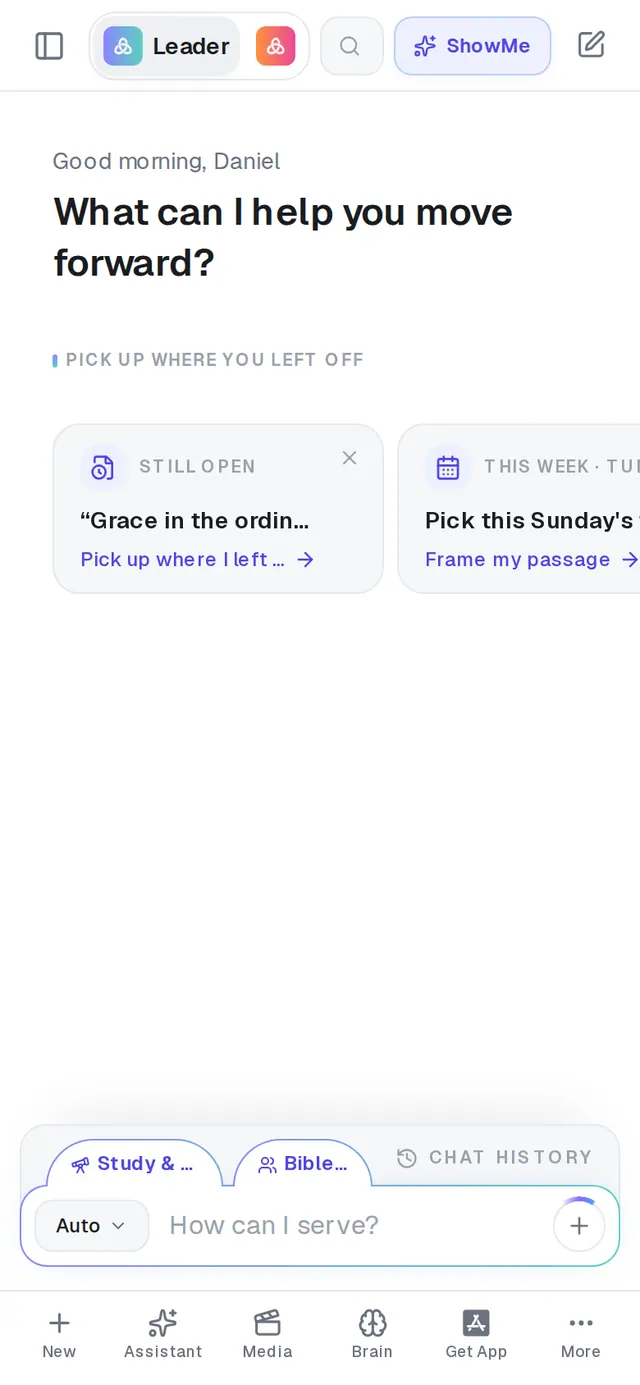
1/3 · Tap Get App in the bar along the bottom
Good to know
- Aligned is always current inside the app — new features arrive the moment they ship, with no store update needed. Now and then a card says A new version of the iPhone app is out (or the Android app). Tap Open the App Store or Open Google Play and update; each release asks once per phone.
- Rather not use the store? In Safari, tap Share, then Add to Home Screen (on Android, Chrome's ⋮ menu, then Install or Add to Home screen). The shortcut opens Aligned full-screen, but it can't send notifications or keep recording a meeting with the screen locked — the store app can.
- Signed out inside the app? On the chat screen, tap Sign in next to Returning user? at the very bottom.
If it’s not working
The Get App button is gone
That's on purpose: once your account has opened the app, every download button hides for good, and the tab turns back into Saved after you've tapped a store button in that browser. Search the App Store or Google Play for AlignedAI instead.
I installed it but I can't find it on my phone
Search your phone for “Aligned”. The icon is labelled AlignedAI, so a search for the full store name can miss it.
Notifications or meeting recording don't work
Check whether you installed the app from the store or added a shortcut from your browser — they look almost the same, but only the store app has notifications and recording that keeps going with the screen locked.
It keeps telling me to update
The update card only appears inside the store app, and only once per release. If you're seeing an update message in Safari or Chrome, that isn't the app. Installing the latest version from the store settles it either way.
Next, you might want to
- Find your way around on your phoneThe bar along the bottom, the More menu and its search — where everything in Aligned lives on a phone.
- Turn on notifications on your phoneGet your reminders, your morning brief and a nudge to finish a draft on your phone — and fix them when they don't arrive.
- Install Aligned on your MacDownload the real Mac app — a full window you can resize — instead of the small iPhone version.
- Finish connecting Google in the phone appFix “I connected Google in the app but it still says not connected” — the one step nobody tells you.