Try Aligned before you make an account
You'd like to see what Aligned writes before you hand over an email address. Fair enough: signed out, you can pick your tradition, watch a sermon get written and keep one whole conversation going, and that conversation comes with you if you make a free account later.
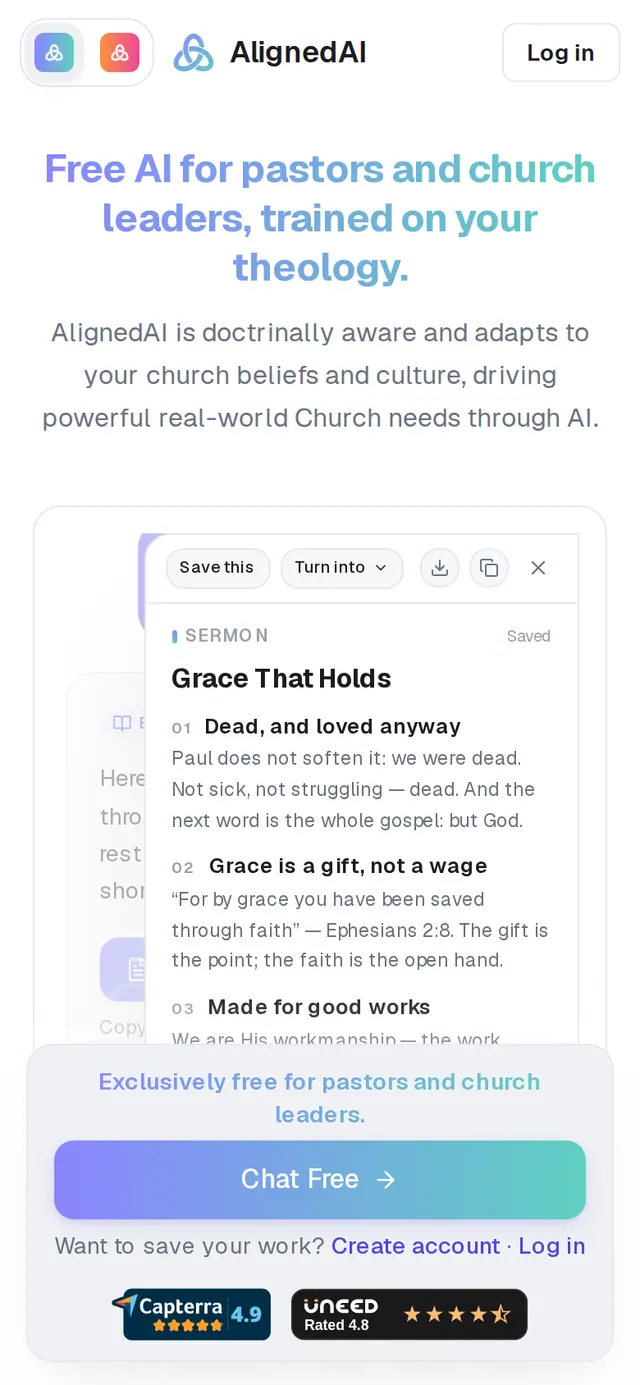
1/7 · Go to aligned.church/leader and tap Chat Free
Good to know
- Signed out, saving a draft, opening a verse in the study panel, Media, the Assistant and Meetings each ask you to create a free account first. ShowMe walkthroughs start once you have one.
- Once your free chat has started, leaving the page or reloading it starts a fresh chat — and that one asks you to create an account. Finish what you're working on first.
- Answers come in the language your browser is set to (English or Español). Choosing a language is a setting that comes with an account.
If it’s not working
It asked me to create an account after one chat
That's the guest limit: one free conversation. Reloading the page or coming back later starts a new chat, which counts as the second. Create a free account and you can start as many chats as you like.
It says “You've reached today's limit for guests.”
That's a daily safety limit on guest messages — everyday use doesn't reach it. Create a free account to save this chat and keep going.
Where did my guest chat go after I signed up?
It comes into the account you create next. Look for the card marked Saved to your church on your new home screen, or open Chat History. Signing in to an account you already had doesn't bring it across — message us from Support if that happened.
There's no ShowMe button and no bar along the bottom
Those come with an account. Signed out, the menu is behind the icon at the top-left of the screen.
Next, you might want to
- Create your free Aligned accountSign up with your email, land in Aligned Leader, and keep the chat you started as a guest.
- Set up Aligned for your churchAnswer the first-time setup questions so every answer fits your tradition, your church and the way you preach.
- What's included in the free planWhat counts as a request, how many you get, when they reset, and where to see what's left.
- Write this Sunday's sermonGo from a passage or topic to a full sermon draft in your tradition, ready to shape.